SafeSpend

ADHD budget planner app

The ADHD budget planner app that shows what you can safely spend today

SafeSpend is the ADHD budget planner app that turns your balances, upcoming bills and next paycheck into one calm number, even if you haven't tracked anything all week. It's a budget tracker, bill tracker and spending tracker with none of the upkeep.

  • One purchase
  • No subscription
  • No bank login
  • Works offline
Real SafeSpend screens, shown with the built-in sample plan.

Built for ADHD brains

A budget app for ADHD that doesn't punish you for missing a day

Most budget planners fall apart the week you stop logging. SafeSpend is designed for real life: forgotten receipts, surprise bills and busy weeks.

One number, not a spreadsheet

Open the app and see what's safe to spend today, with bills and savings already taken out.

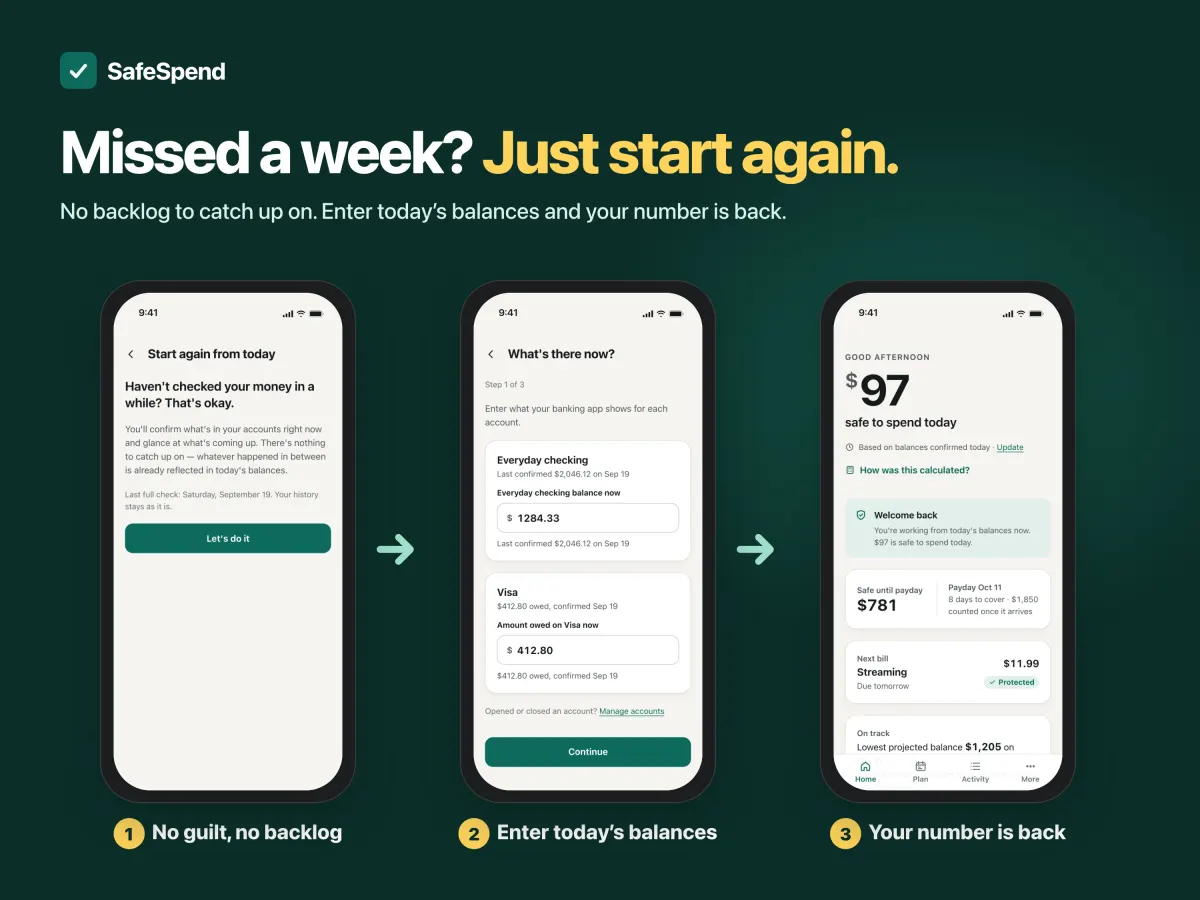
Missed a week? Start again

Type today's balances and you're back on track in about three minutes. No catching up required.

Check before you buy

Try a purchase first and see how it changes your daily number, or park it in the waiting room and decide later.

No upkeep, no streaks

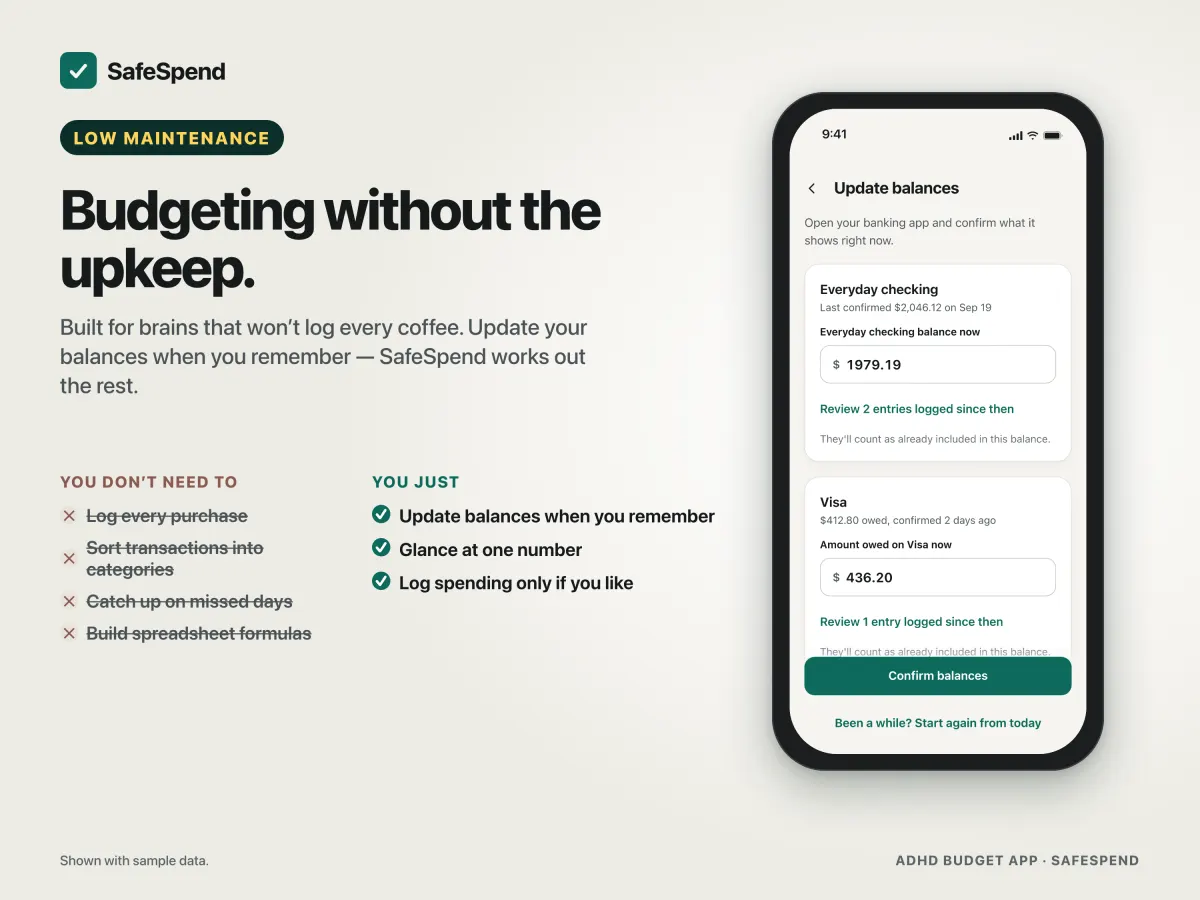
Confirm a balance now and then instead of logging every coffee. Every number shows how it was calculated.

How it works

Your digital budget planner, bill tracker and spending tracker in one

Everything you'd piece together from separate budget templates and tracker sheets, working together so the number you see is always the safe one.

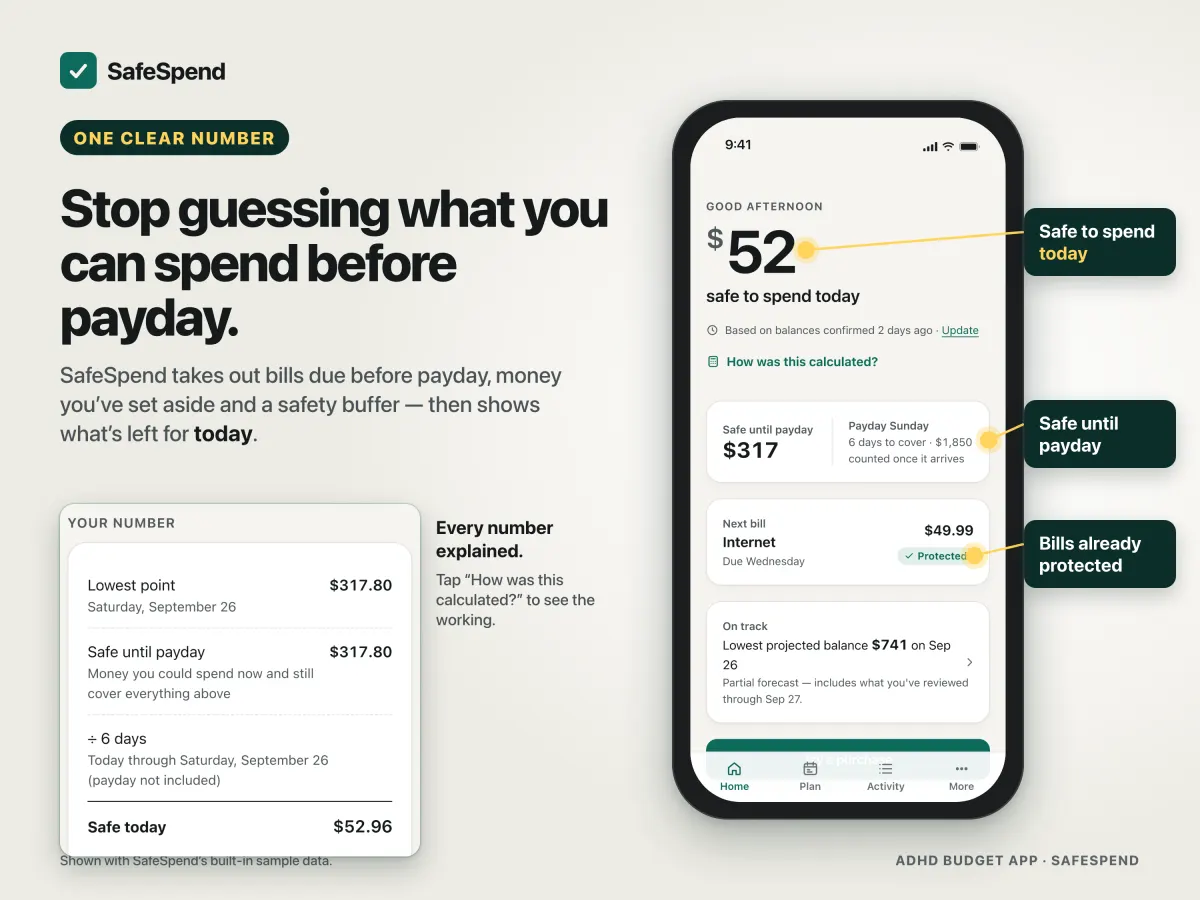
SafeSpend budget planner showing $52 safe to spend today, $317 safe until payday and the Internet bill already protected

Budget planner: stop guessing before payday

SafeSpend takes out bills due before payday, money you've set aside and a safety buffer, then shows what's left for today and until your next paycheck.

  • Safe to spend today and safe until payday
  • Tap "How was this calculated?" to see every step
  • A 45-day plan shows your lowest upcoming balance
SafeSpend bill tracker keeping upcoming bills protected without logging every purchase

Bill tracker: bills protected before you spend

Add rent, subscriptions, loans and utilities once. SafeSpend reserves what's due before payday so a bill never catches you out.

  • Repeating bills and paychecks on your real schedule
  • See the next bill and when it's due
  • Mark bills paid as they go out
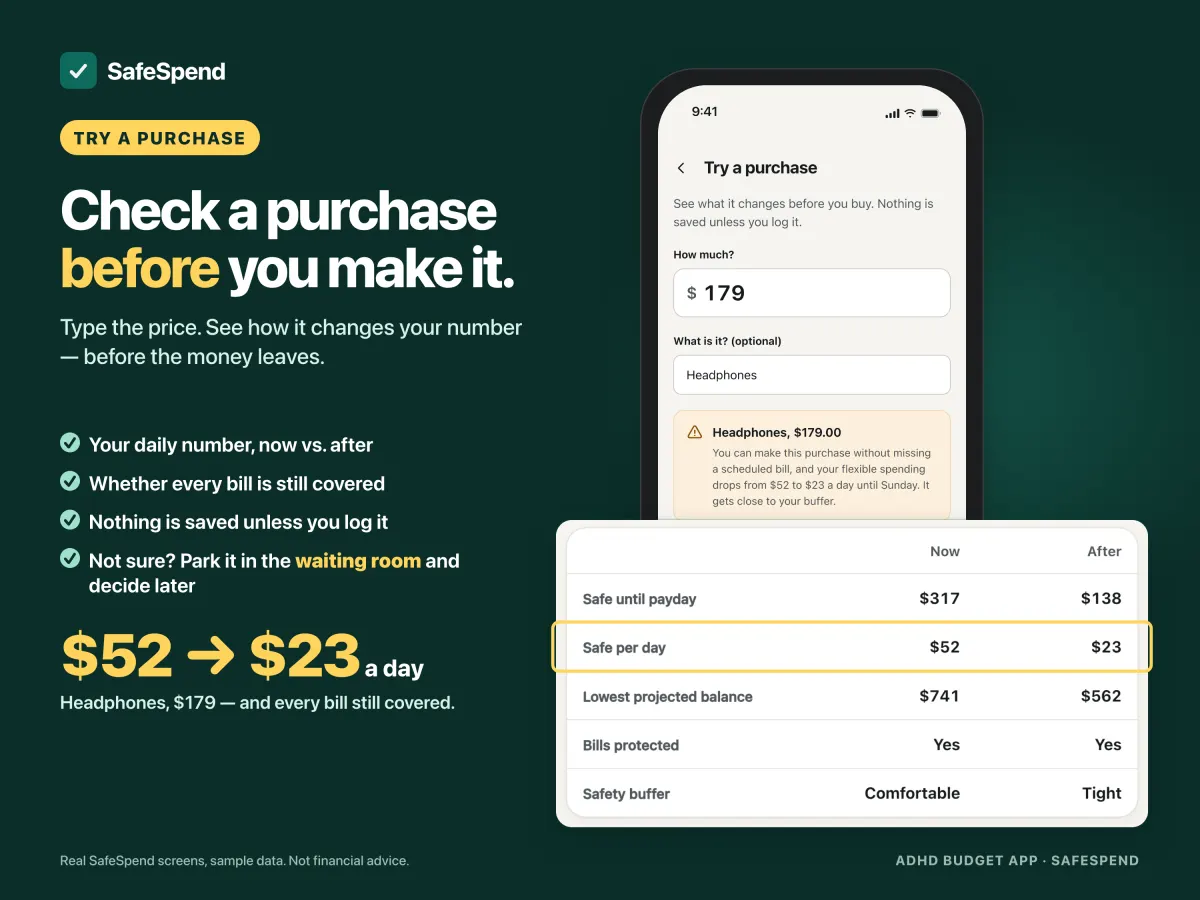
SafeSpend spending tracker: a $179 purchase changes the safe daily amount from $52 to $23

Spending tracker: know before you spend

Thinking about headphones, a takeaway or a concert ticket? Try the purchase first and see your new daily number before your card comes out.

  • Try a purchase without committing anything
  • A waiting room for impulse buys
  • Log spending in a couple of taps when you want to
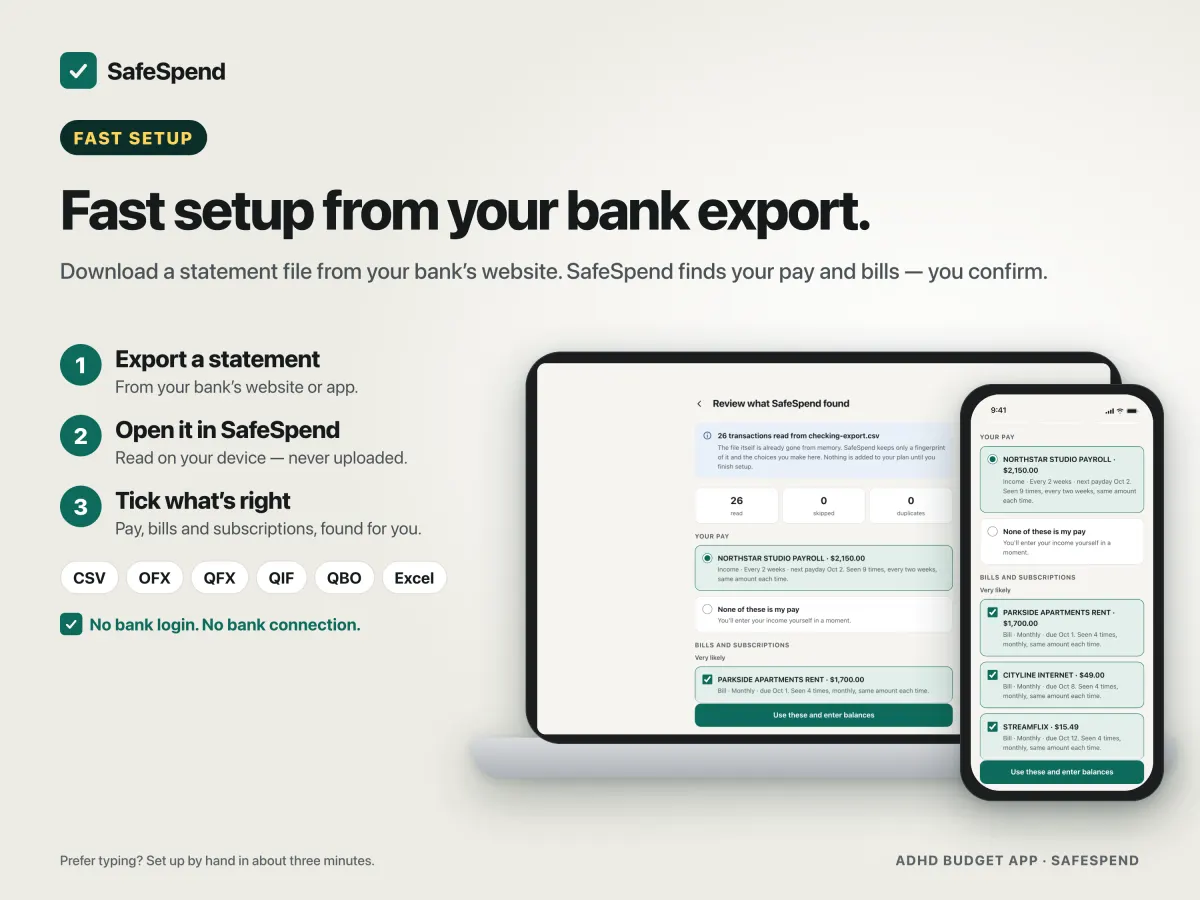
SafeSpend income and expense tracker importing a bank statement file and detecting paychecks and bills

Income & expense tracker: set up from a bank file

Import a statement you download from your bank and SafeSpend suggests your paycheck, repeating bills, subscriptions and transfers. You review every choice. Nothing connects to your bank.

  • CSV, OFX, QFX, QIF, QBO and Excel (.xlsx)
  • Or enter your plan by hand in minutes
  • Corrections are remembered next time
SafeSpend ADHD budget app Reset From Today: start again after a missed week in three steps

Finance planner that forgives a missed week

Life happens. Reset From Today walks you through today's balances, recent activity and upcoming bills, then shows your number again, with no backlog to clear.

  • Three short steps
  • No shame, no streaks, no catch-up logging

Everything included

All the budget tools, one purchase

Budget tracker

Balances, money set aside and a safety buffer, turned into one safe amount.

Bill tracker

Upcoming bills protected automatically until they're paid.

Spending tracker

Log purchases, try one before buying, or park it in the waiting room.

Income & expense planner

Paychecks and expenses on a forward-looking plan, with activity you can review.

Savings goals & debt

Track goals and debt payoff alongside your plan.

Categories, backup & more

Categories, backup and restore, moving to a new device, dark mode and larger text.

Private by design

Your money stays yours

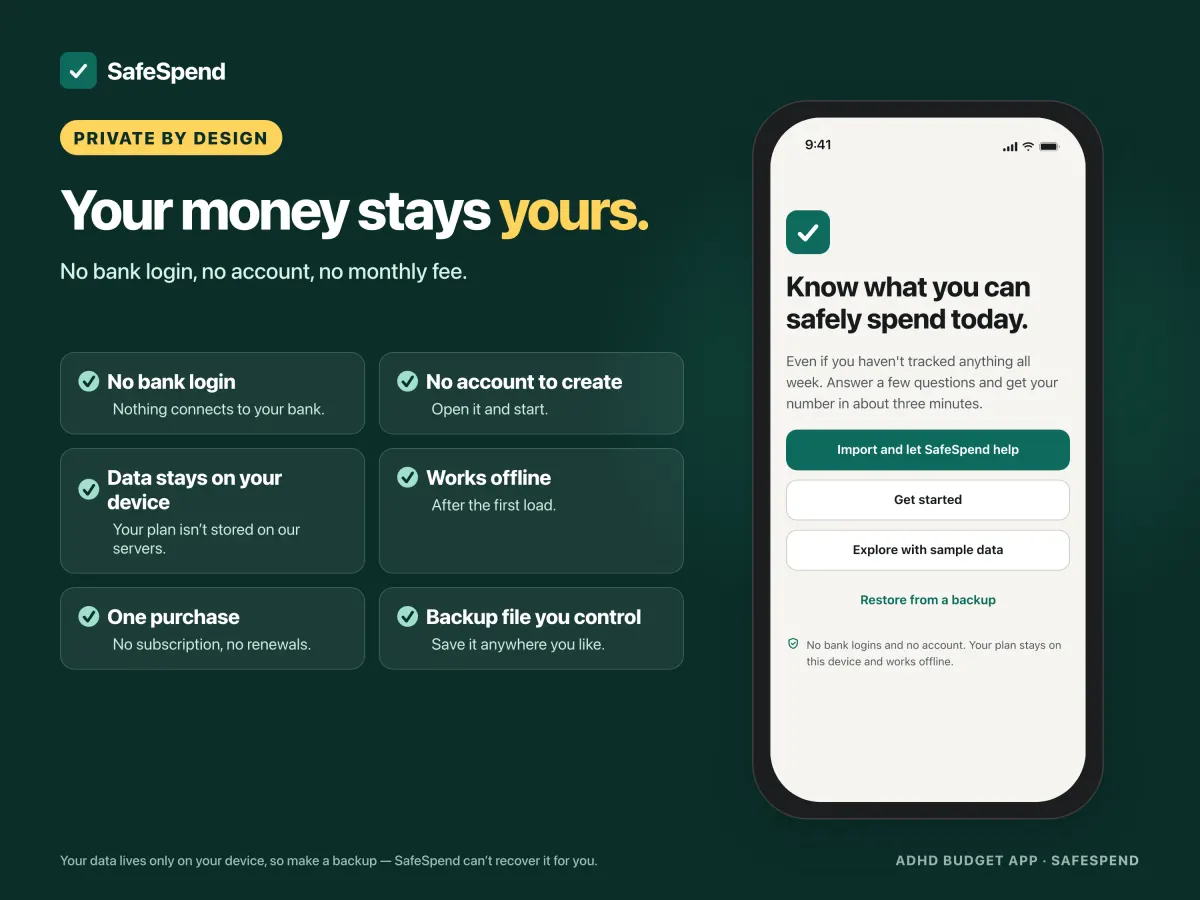
SafeSpend runs on your device. Your plan, balances and bank files are never stored on our servers, and nothing connects to your bank.

  • No bank login and no account to create
  • Data stays on your device and works offline after the first load
  • One purchase: no subscription, no renewals
  • A backup file you control. Save it anywhere you like
SafeSpend private budget tracker: no bank login, no account, data stays on your device, works offline, one purchase
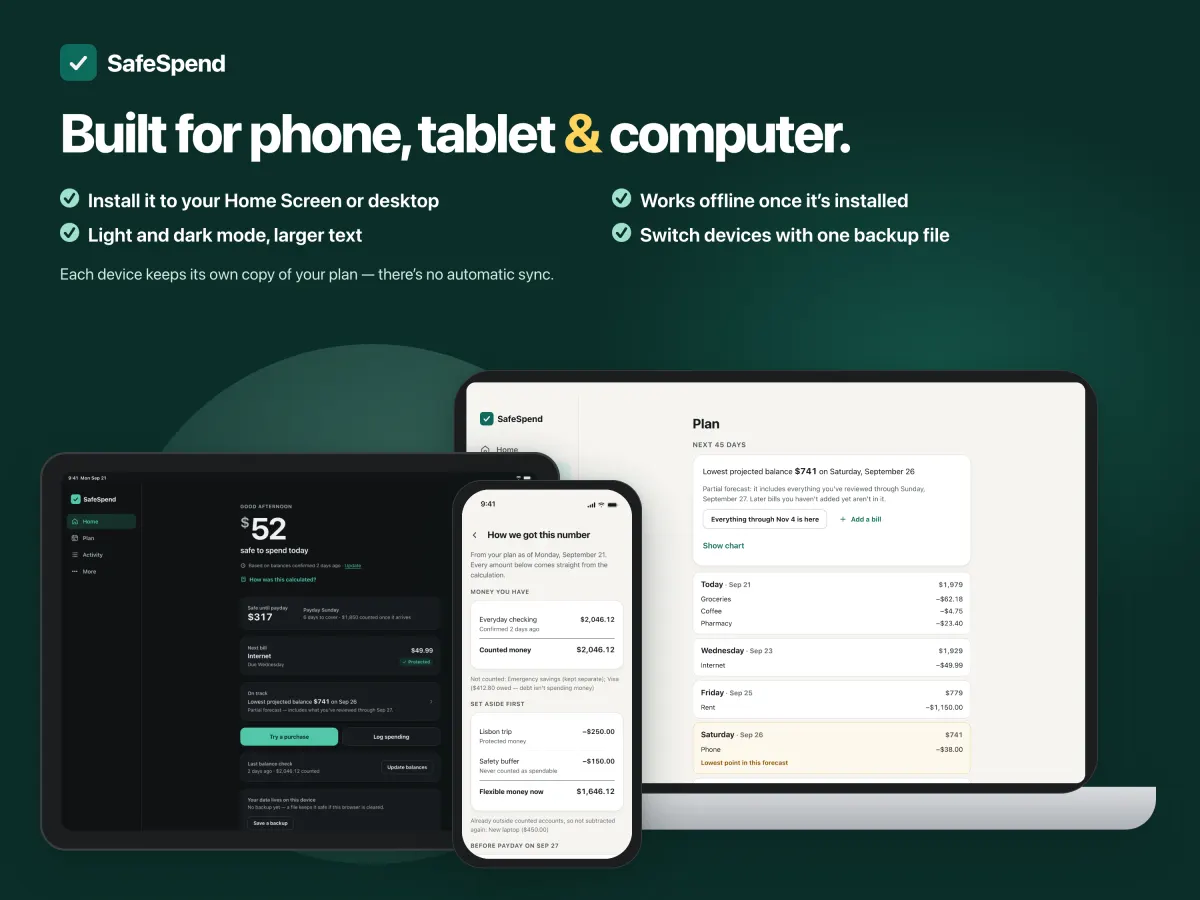
SafeSpend budget planner app on a phone, tablet and computer, in light and dark mode

Phone, tablet and computer

Install it like an app, from your browser

SafeSpend adds to your home screen on iPhone, iPad and Android, and installs on Windows and Mac. Dark mode and larger text are built in.

  • Works offline after the first load
  • Each device keeps its own copy. Move your plan with a backup file

Instant digital download on Etsy

Get the ADHD budget planner app today

Your download includes START HERE and the SafeSpend Guide, with the private link that unlocks the app. Open it, add SafeSpend to your home screen, and see your number in about three minutes.

Get SafeSpend on Etsy

Not sure yet? Try the free demo in your browser first, with sample data.

Questions

Frequently asked questions

Is SafeSpend a budget app for ADHD?

Yes. SafeSpend is built around one number, what you can safely spend today, so there is no spreadsheet to maintain, no streak to keep and no backlog to catch up on. If you miss a week, you start again from today's balances in about three minutes.

Do I need to connect my bank account?

No. SafeSpend never asks for a bank login. You type your balances, or import a file you download from your bank (CSV, OFX, QFX, QIF, QBO or Excel), and you review everything it suggests.

Is there a subscription?

No. SafeSpend is a one-time purchase on Etsy. There is no monthly fee, no renewal and no account to create.

Which devices does the budget planner work on?

SafeSpend installs from the browser on iPhone, iPad, Android phones and tablets, Windows and Mac. After the first load it works offline. Each device keeps its own copy of your plan; you can move it between devices with a backup file.

Where is my financial data stored?

On your device. Unless you turn on sync between your own devices, your plan, balances, bills and imported statements never leave it. With sync, your devices share a copy that is encrypted before it leaves, and SafeSpend can't read it. Either way, make a backup file after setup and after meaningful changes.

How do I get SafeSpend after buying on Etsy?

Your instant Etsy digital download includes START HERE and the SafeSpend Guide. START HERE contains your private link: open it once and SafeSpend unlocks in that browser, then add it to your home screen.

Already bought SafeSpend?

Open the private link in the START HERE guide from your Etsy order. It unlocks this browser, with no account or password. Using SafeSpend from your home screen? Home-screen apps can keep separate storage from your browser, so paste your link here to unlock that one too.